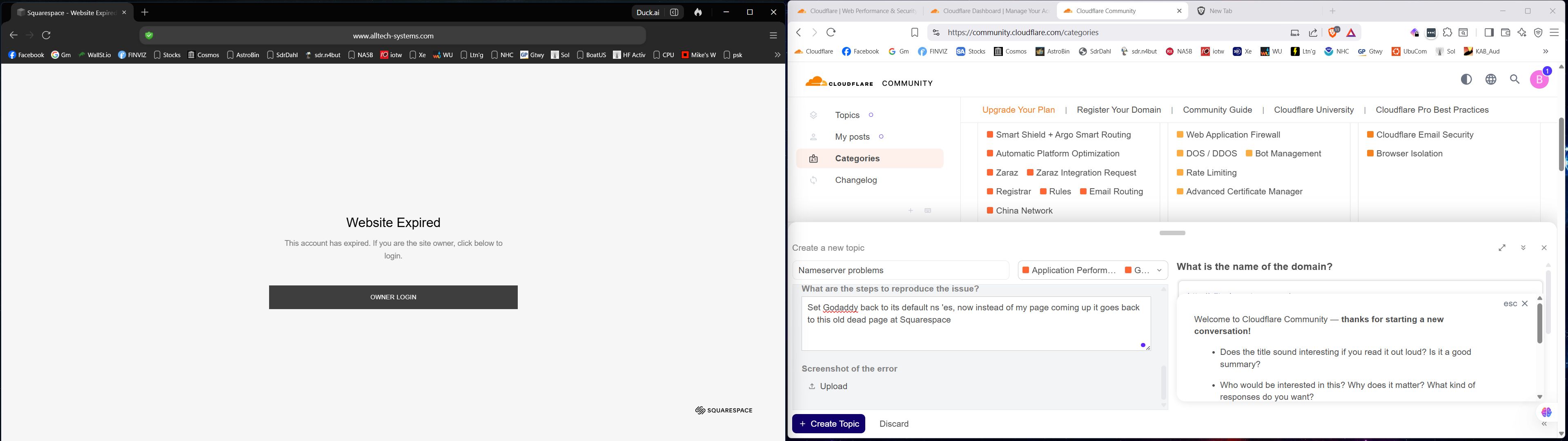
Hi, I got lost but am back. GoDaddy says all is well there including the ns ‘s. My domain, when entered into browser, and looking at source, has six lines of script declaring it a dead Squarespace site and that script is stopping the page at that notice, nothing else happens. How can I ftp or whatever to get rid of that HTML scripting?
I am still at zero functionality for my static page. Should I try a support ticket? That old scripting from SquareSpace needs to disappear; is there an FTP-type tool here that I can use or is editing only done by tech support?
ChatGPT ran the A-type IP addresses and reports that Squarespace is the actual host of my problem HTML code for alltech-systems.com. Is that possible??? I closed and deleted everything there, can’t log back in…
Is it your intention to use GoDaddy, to host your website?
Is it your intention to use Squarespace, to host your website?
Currently, your first four “A” records, with the “198.*” IPv4 addresses, as well as the last “CNAME”, named “www”, they are all sending your website’s traffic to Squarespace.
You will need to direct that question to your actual hosting provider.
According to the DNS records you shared above, you will therefore need to contact Squarespace, regarding how to build, or otherwise maintain your website.
So that leads back to the initial questions above, regarding your actual intentions.
I thought Cloudflare would host as soon as I can get rid of Square. Godaddy has been my registrar for years, once even hosted a real website. I cannot get anywhere with SquareSpace, I am locked out can’t get my old account restored to even try to transfer out.
New News, I was instructed by a guy at Squarespace Community help, to just delete all those DNS records that go there and replace them with new entries that keep things at Cloudflare. Step one completed, a browser no longer presents the SquareSpace signed “Site Expired” screen. I don’t know how to create new entries to put in place of those now gone A listings. My life is wasting away dealing with this mess.
Understand all of this is over my head! I think Cloudflare is my new host, they sent an e-mail message informing me that it was active. When I put the nameservers at my Godaddy account back to Godaddy defaults, my page came up in browsers just fine! But Cloudflare requires them, at least in my case, to be Ashley and Simon. That’s when they said they’d delete my site if I did not put their two back in at Godaddy, So it is, now. But; things went back to the old SquareSpace signed “Expired Site” notice, until I deleted all those DNS records, and good news, that worked to get SquareSpace out of the screen, but I need DNS listings now to get everyone to Cloudflare! CLEAR as mud, YES???
Not a complete functioning website yet. I have a friend working on a permanent one, but I was using the static page { alltech-syetems.com } here as an interim measure to get that page-full of info out there!
Ok, can you please go to the Account Home page in Cloudflare and show a screenshot of that? Specifically the part in the middle where it says Workers and Pages.
Edit: Also, when did you upload the static page to Cloudflare?